Also covers
What we are going to do?
We are going to create a simple console application to
Basic requirement
In program.cs
- Create site in IIS using C#
- Create and bind website in IIS using specific port in C#
- Programatically create a website in IIS in C#.
- Automate IIS using C#
- Check website exists on IIS or not.
- Check IIS installed or not.
- Check IIS state either running or stopped or pending.
What we are going to do?
We are going to create a simple console application to
Basic requirement
- Microsoft.Web.Administration.dll
- Runtime version: v2.0.50727
- Location: C:\Windows\System32\inetsrv\Microsoft.Web.Administration.dll
- System.ServiceProcess.dll
- Runtime version: v4.0.30319
- Location: C:\Program Files (x86)\Reference Assemblies\Microsoft\Framework\.NETFramework\v4.0\System.ServiceProcess.dll
In program.cs
using System;
using System.Collections.Generic;
using System.Linq;
using System.ServiceProcess;
using System.Text;
using Microsoft.Web.Administration;
using System.Net;
using HostHsmApp;

namespace Create_IIS_website
{
    class Program
    {

        private static void CreateAppPool(
            string poolname,
            bool enable32bitOn64,
            ManagedPipelineMode mode,
            string runtimeVersion = "v4.0")
        {
            using (ServerManager serverManager = new ServerManager())
            {
                ApplicationPool newPool = serverManager.ApplicationPools.Add(poolname);
                newPool.ManagedRuntimeVersion = runtimeVersion;
                newPool.Enable32BitAppOnWin64 = true;
                newPool.ManagedPipelineMode = mode;
                serverManager.CommitChanges();
            }
        }


        private static void CreateWebsite(
            string websiteName,
            string hostname,
            string phyPath,
            string appPool,
            string port = "80")
        {
            ServerManager iisManager = new ServerManager();
            iisManager.Sites.Add(websiteName, "http", "*:"+ port +":" + hostname, phyPath);
            iisManager.Sites[websiteName].ApplicationDefaults.ApplicationPoolName = appPool;


            string ipAddress = "*";
            if (Dns.GetHostAddresses(Dns.GetHostName()).Length > 0)
            {
                string hostName = Dns.GetHostName();
                ipAddress  = Dns.GetHostByName(hostName).AddressList[0].ToString();
            }
            serverManager.Sites[websiteName].Bindings.Add(ipAddress + ":"+ port.ToString() + ":", "http");


            foreach (var item in iisManager.Sites[websiteName].Applications)
            {
                item.ApplicationPoolName = appPool;
            }

            iisManager.CommitChanges();
        }


        static void CreateIISWebsiteNow()
        {
            try
            {
                ServiceController sc = new ServiceController("World Wide Web Publishing Service");
                if ((sc.Status.Equals(ServiceControllerStatus.Stopped) || sc.Status.Equals(ServiceControllerStatus.StopPending)))
                {
                    Console.WriteLine("IIS service stopped, starting...");
                    sc.Start();
                }
                else
                {
                    Console.WriteLine("Service already running...");
                    sc.Stop();
                }

                if (sc.Status.Equals(ServiceControllerStatus.Running))
                {

                    Console.WriteLine("Do you want to create an Application Pool:y/n");
                    string response = Console.ReadLine();
                    if (response.ToString() == "y")
                    {
                        Console.Write("Enter Application Pool Name:");
                        string poolname = Console.ReadLine();
                        bool isEnable32bit = false;
                        ManagedPipelineMode mode = ManagedPipelineMode.Classic;
                        Console.Write("Need to enable 32 bit on Windows 64 bit?y/n [Applicable for 64 bit OS]: y/n?");
                        string enable32bit = Console.ReadLine();
                        if (enable32bit.ToLower() == "y")
                        {
                            isEnable32bit = true;
                        }
                        Console.Write("Select Pipeline Mode: 1 for Classic, 2 for Integrated:");
                        string pipelinemode = Console.ReadLine();
                        if (pipelinemode.ToLower() == "2")
                        {
                            mode = ManagedPipelineMode.Integrated;
                        }
                        Console.Write("Select Runtime Version for Application Pool: 1 for v2.0, 2 for v4.0:");
                        string runtimeVersion = Console.ReadLine() == "1" ? "v2.0" : "v4.0";

                        CreateAppPool(poolname, isEnable32bit, mode, runtimeVersion);
                        Console.WriteLine("Application Pool created successfully...");
                    }
                    Console.WriteLine("Do you want to create a website:y/n");
                    response = Console.ReadLine();
                    if (response.ToString() == "y")
                    {
                        Console.Write("Enter website name:");
                        string websiteName = Console.ReadLine();
                        Console.Write("Enter host name:");
                        string hostname = Console.ReadLine();
                        Console.Write("Enter physical path for website:");
                        string phypath = Console.ReadLine();
                        Console.WriteLine("Enter Application pool Name from listed name:");
                        foreach (var pool in new ServerManager().ApplicationPools)
                        {
                            Console.WriteLine(pool.Name);
                        }
                        Console.WriteLine("");
                        Console.Write("Please enter Application pool Name for web site:");
                        string poolName = Console.ReadLine();
                        CreateWebsite(websiteName, hostname, phypath, poolName);
                        Console.WriteLine("Website created successfully.");
                        Console.ReadLine();
                    }
                }
            }
            catch (Exception exc)
            {
                Console.WriteLine("Error:" + exc.Message);
            }
        }

        static void Main(string[] args)
        {
            CreateIISWebsiteNow();
            Console.Read();
        }
    }
}
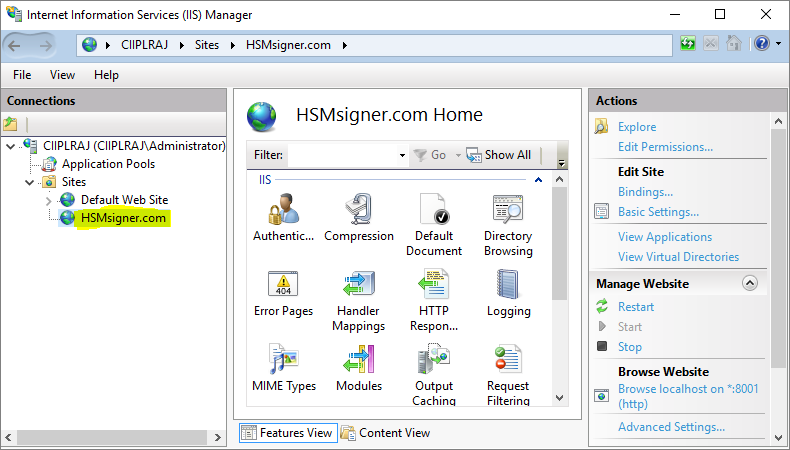
Output in IIS Manager