Saturday, 23 December 2017

How to create Visual Studio Project Templates?

Highlights

In this document we will found answer of following questions:
  • What is Visual Studio Project Templates? 
  • Where to found, real example? 
  • Can we create something like that yourself? 
  • Where to start? 
  • What we will able to do after visiting given reference? 
  • How to create a new project template, only .csproj? 
  • How to create .VSIX extension to deploy project template? 
  • How to create a solution (.sln) template with multiple projects (.csproj)? 


What is Visual Studio Project Templates?

It is predefined project with limited base resources, that provide good starting point for programmer to begin creating visual studio projects or expanding current visual studio projects.


Where to found, real example?

Whenever we create a new project through visual studio, we use predefined template given by Microsoft Visual Studio.


Can we create something like that yourself?

Yes


Where to start?

Self-learning Reference:
https://msdn.microsoft.com/en-us/library/ms247121.aspx
https://docs.microsoft.com/en-us/visualstudio/extensibility/creating-custom-project-and-item-templates


What we will able to do after visiting given reference?

We can create
  • An individual project (.csproj) template. 
  • A solution(.sln) with multiple projects(.csproj) template. 


Let's see in action
There are 2 ways to do it
  • Create a template project by exporting template from any of .csproj project and paste in specific folder, from where Visual studio can read and parse template to prompt in to New Project window. Somehow this process is manually, but works smoothly. 
  • Export a template from .csproj project and create a Visual studio extension (.VSIX) and distribute it to coworker so they can install it by clicking once and they will get template in new project window. Little bit more afford then manually process but seems smart solution. 
We will cover both the way in action.

How to create a new project template, only .csproj?

Prerequisite
  • Visual studio 2017 
  • Visual Studio Extensibility Templates 


How to create a new project template, only .csproj?
How to create .VSIX extension to deploy project template?
How to create a solution (.sln) template with multiple projects (.csproj)? 

Watch in YouTube
Wednesday, 13 December 2017

Basic of AutoMapper in C#

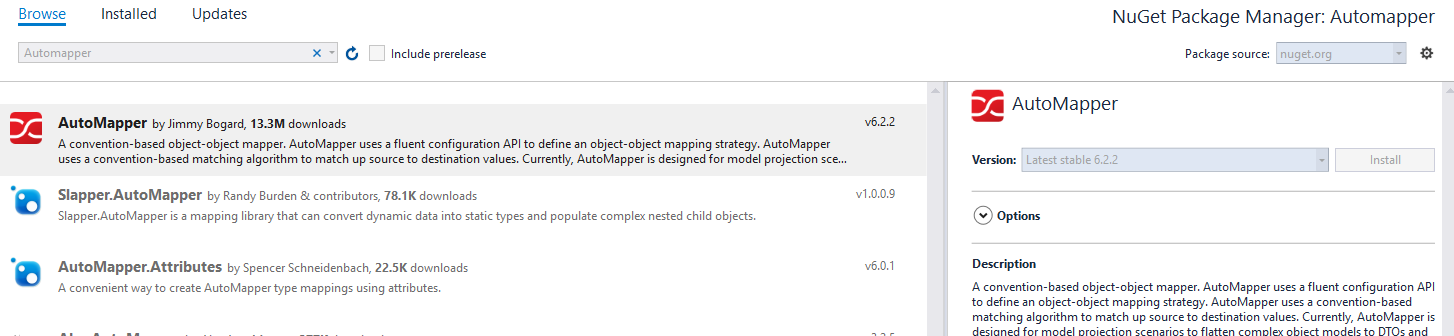
AutoMapper is a dll which is used to mapped one object to another.
  • No longer need to manually map objects.
  • Good to use for ViewModel/CreateModel, Request/Response entity.
  • Least used features of AutoMapper is projection. AutoMapper, when used with an Object Relational Mapper (ORM) such as Entity Framework,

How to Use?

Just Install it through Nuget Package manager and use it.


using AutoMapper;
using AutomapperDemo.Models;
using static System.Console;
 
namespace AutomapperDemo
{
    class Program
    {
        static void Main(string[] args)
        {
            User user = new User()
            {
 
                ID = 100,
                FirstName = "Raj",
                LastName = "Kumar",
                Address = "Delhi",
                Company = "AAPC",
                Dept = "IT",
                OfficialEmail = "blog.raj111@gmail.com",
                FatherName = "R.J.T",
                Gender = "Male",
                Maritialstatus = "Married",
                Mobile = "8888888888"
            };
 
            Mapper.Initialize(config =>
            {
 
                config.CreateMap<UserUserPersonalInfo>();//All properties are same
 
                config.CreateMap<UserUserOfficialInfo>()
                    .ForMember(d => d.UserID, m => m.MapFrom(s => s.ID));//Map different property 
 
                config.CreateMap<UserUserViewModel>()
                    .ForMember(d => d.Name, m => m.MapFrom(s => s.FirstName + " " + s.LastName))//Modify property
                    .ForMember(d => d.ID, m => m.Ignore());//Ignore Default mapping
 
            });
 
 
            var personalInfo = Mapper.Map<UserUserPersonalInfo>(user);
            var officialInfo = Mapper.Map<UserUserOfficialInfo>(user);
            var userViewModel = Mapper.Map<UserUserViewModel>(user);
 
            //Explicit mapping through configuration
            var userProfileInfo = AutoMapperSetup.UserProfileInfoConfig.CreateMapper().Map<UserProfileInfo>(user);
 
            Read();
 
        }
    }
}


namespace AutomapperDemo.Models
{
    class User
    {
        public int ID { getset; }
        public string FirstName { getset; }
        public string LastName { getset; }
        public string FatherName { getset; }
        public string Gender { getset; }
        public string Maritialstatus { getset; }
        public string Mobile { getset; }
        public string OfficialEmail { getset; }
        public string Address { getset; }
        public string Company { getset; }
        public string Dept { getset; }
 
    }
    class UserOfficialInfo
    {
        public int UserID { getset; }
        public string OfficialEmail { getset; }
        public string Address { getset; }
        public string Company { getset; }
        public string Dept { getset; }
    }
 
    class UserPersonalInfo
    {
        public string FirstName { getset; }
        public string LastName { getset; }
        public string FatherName { getset; }
        public string Gender { getset; }
        public string Maritialstatus { getset; }
        public string Mobile { getset; }
    }
 
    class UserViewModel
    {
        public int ID { getset; }
        public string Name { getset; }
        public string FatherName { getset; }
        public string Gender { getset; }
 
    }
 
    class UserProfileInfo
    {
        public int ID { getset; }
        public string Name { getset; }
    }
}
 
namespace AutomapperDemo.Models
{
    //This is how we can explicit define the configuration and later on can create mapper on demand.  
    public static class AutoMapperSetup
    {
        public static MapperConfiguration UserProfileInfoConfig = new MapperConfiguration(config =>
        {
            config.CreateMap<UserUserProfileInfo>()
            .ForMember(dto => dto.ID, conf => conf.MapFrom(src => src.ID))
            .ForMember(dto => dto.Name, conf => conf.MapFrom(src => $"{src.FirstName} {src.LastName}"));
        });
    }
}


How to Map reverse or Vice versa in AutoMapper?

Just taking the example of above code if we add one more line

var reverseUser = Mapper.Map<UserViewModel, User>(userViewModel);

It will throw an error:

Unmapped members were found. Review the types and members below.
Add a custom mapping expression, ignore, add a custom resolver, or modify the source/destination type
For no matching constructor, add a no-arg ctor, add optional arguments, or map all of the constructor parameters
==================================================================
AutoMapper created this type map for you, but your types cannot be mapped using the current configuration.
UserViewModel -> User (Destination member list)
AutomapperDemo.Models.UserViewModel -> AutomapperDemo.Models.User (Destination member list)

Unmapped properties:
FirstName
LastName
Maritialstatus
Mobile
OfficialEmail
Address
Company
Dept

This is because we haven't instructed AutoMapper to map object reversely, so what we need to do here is, while configuring Createmap we need to call one one method  ReverseMap().


config.CreateMap<UserUserViewModel>()
    .ForMember(d => d.Name, m => m.MapFrom(s => s.FirstName + " " + s.LastName))//Modify property
    .ForMember(d => d.ID, m => m.Ignore()) //Ignore Default mapping
    .ReverseMap() //We can again set .ForMember for reverse value if needed.
    ;

How to map case sensitive fields or object names in Automapper?

Auto-mapper having functionality to map case sensitive or custom conditional mapping with fields.
Like in the above example if i create a new Model

class User_view_model
{
    public int Id { getset; }
    public string Name { getset; }
    public string Father_name { getset; }
    public string Gender { getset; }
 
}

And want to map it like this
var underscore = Mapper.Map<UserViewModelUser_view_model>(userViewModel);

We can use it by just configuring conditional mapping
// for the auto mapping with MyNameIsRaj to My_name_is_raj.
config.AddConditionalObjectMapper().Where((s, d) => s.Name == d.Name.ToUnderscoreCase());

You would also required an extension method
public static class StringExtensions
{
    public static string ToUnderscoreCase(this string str)
    {
        return string.Concat(str.Select((x, i) => i > 0 && char.IsUpper(x) ? "_" + x.ToString() : x.ToString())).ToLower();
    }
}

Reference:

http://automapper.org/
https://www.codeproject.com/Articles/61629/AutoMapper
https://www.codeproject.com/Articles/814869/AutoMapper-tips-and-tricks

Wednesday, 6 December 2017

'Entity' is an ambiguous reference between 'X' and 'Y' in Entity Framework

Today I got following error message while we had same entity in two different DbContext.

         Error   CS0104  'EntityName' is an ambiguous reference between 'NameSpace1.EntityName' and 'NameSpace2.EntityName'   


Old Code Snippet:           
                                         
using (var repository = new DbContext1())
{
    var entity = new EntityName
    {
New Code Snippet (solution):          
                                        
using (var repository = new DbContext1())
{
    var entity = new Model.EntityName

    {

Sunday, 3 December 2017

Data Protection in Asp.net Core

Basic of Data Protection

  • Asp.net Core came up with the nice solution for protecting data.
  • When ever we say data protection it relates us to Encryption and decryption of data.
  • Now no more machine key related methods, that was in asp.net where  we where storing machine key in to web.config file for each application.
    • System.Web.Security.MachineKey.Protect();
    • System.Web.Security.MachineKey.UnProtect();
  • It was hard to handle the situation where we were mess up with multiple machine key and it was very confusing to use which key to decrypt data.
    • Swapping application on other system and
    • Web farm

What we have now are

  • Key on demand, Now we an use any of them 
    • Custom algorithm
    • Digital certificate
  • Shareable Key, We can store key in shared location like
    • Shareable Directory
    • Local Store
    • HSM/Azure vault
  • Auto key rotation, Application tack care of expiration of key and creation of new key.
  • (n - level) isolation for different context. Set key on each level of processing.

Building blocks

IDataProtectionProvider
Factory used to create IDataProtection instances.

IDataProtector
Service used to protect and unprotect data.

IServiceCollection.AddDataProtection()
Service configuration used to protect and unprotect data.


Snippet looks like


services.AddDataProtection()
               .PersistKeysToFileSystem(new DirectoryInfo(@"D:\\DotNetCore\\Shareable"))//"\\server\share directory\", default %appdata%
               .UseCryptographicAlgorithms(
                   new AuthenticatedEncryptorConfiguration()
                   {
                       EncryptionAlgorithm = EncryptionAlgorithm.AES_256_CBC,
                       ValidationAlgorithm = ValidationAlgorithm.HMACSHA256
                   });                    ;
           // .ProtectKeysWithCertificate("‎5AD833A5B4AE808BB68A2BEDEE9248AB79F292A6");//thumbprint of digital certificate
           //.SetDefaultKeyLifetime(TimeSpan.FromMinutes(14));//default is 90 days, minimum is 7 days

dataProtector = _dataProtectionProvider.CreateProtector("HomeInstance");
          string PlainText = "AspTricks.net";
           string EncryptedText = dataProtector.Protect(PlainText);
           string DecryptedText = dataProtector.Unprotect(EncryptedText);

Video


References link, Official website of Microsoft


Saturday, 18 November 2017

Always Encrypted In SQL Server 2016

Overview Always Encrypted

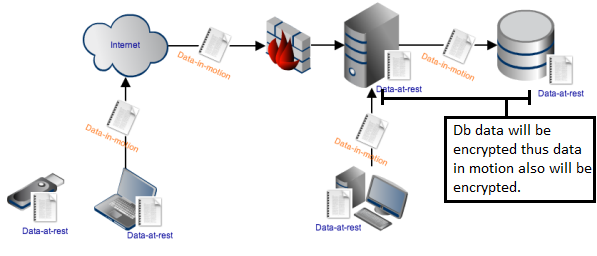
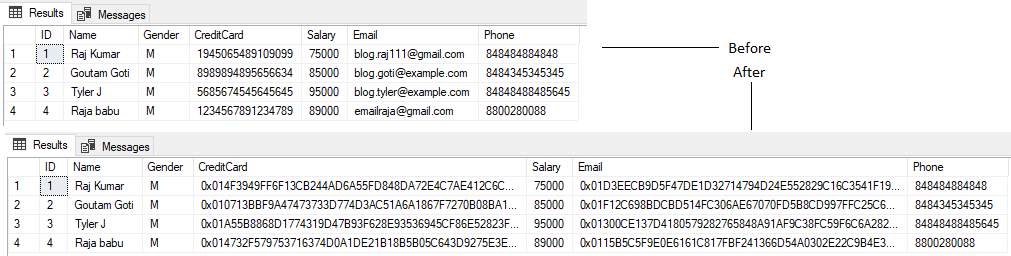
It a new security feature that ensures sensitive data is encrypted in database and remain all time.
Means Encrypted Data at rest.


Advantage

Clear separation between who own the data and who manage the data.

Even DBAs, System admins and cloud admins can’t access data.


How its work?


  • Client driver encrypt data.
  • Required master key digital certificate on both db and application which contain private key.
  • Digital certificate could be store into
    • Local key store - default windows certificate store.
    • HSM - Hardware security module third parties solution to manage dsc in network, like safenet.
    • Azure vault - Microsoft’s cloud-based solution for certificate management
  • Required Column Key


What is Master key and Column key?

Column key protect the data and master key protect the column encryption key.


Configuration

For simple configuration watch a Youtube Video.


C# code to Access Data


using System;
using System.Collections.Generic;
using System.Data;
using System.Data.SqlClient;
using System.Linq;
using System.Text;
using System.Threading.Tasks;
using static System.Console;


namespace ReadWriteAlwaysEncrypted
{
    class Program
    {
        static string connectionString = "Data Source=.; Initial Catalog=DB2016; Integrated Security=true; Column Encryption Setting=enabled";

        static void Main(string[] args)
        {

            //InsertData("Raja babu", "M", "12345678912347" , "89000", "emailraja@gmail.com", "8800280088");
            ReadData(1);
            Read();
        }


        static void InsertData(string name, string gender, string creditCard, string salary, string email, string phone)
        {

            using (SqlConnection connection = new SqlConnection(connectionString))
            {
                connection.Open();
                using (SqlCommand cmd = connection.CreateCommand())
                {
                    cmd.CommandText = @"INSERT INTO dbo.PersonalInformation (Name, Gender,CreditCard, Salary, Email, Phone)VALUES( @Name, @Gender, @CreditCard, @Salary, @Email, @Phone);";

                    SqlParameter paramSSN = cmd.CreateParameter();
                    paramSSN.ParameterName = @"@Name";
                    paramSSN.DbType = DbType.String;
                    paramSSN.Direction = ParameterDirection.Input;
                    paramSSN.Value = name;
                    cmd.Parameters.Add(paramSSN);

                    SqlParameter paramGender = cmd.CreateParameter();
                    paramGender.ParameterName = @"@Gender";
                    paramGender.DbType = DbType.String;
                    paramGender.Direction = ParameterDirection.Input;
                    paramGender.Value = gender;
                    cmd.Parameters.Add(paramGender);

                    SqlParameter paramCreditCard = cmd.CreateParameter();
                    paramCreditCard.ParameterName = @"@CreditCard";
                    paramCreditCard.DbType = DbType.AnsiStringFixedLength;
                    paramCreditCard.Direction = ParameterDirection.Input;
                    paramCreditCard.Value = creditCard;
                    cmd.Parameters.Add(paramCreditCard);

                    SqlParameter paramSalary = cmd.CreateParameter();
                    paramSalary.ParameterName = @"@Salary";
                    paramSalary.SqlDbType = SqlDbType.Int;
                    paramSalary.Direction = ParameterDirection.Input;
                    paramSalary.Value = salary;
                    cmd.Parameters.Add(paramSalary);


                    SqlParameter paramEmail = cmd.CreateParameter();
                    paramEmail.ParameterName = @"@Email";
                    paramEmail.DbType = DbType.String;
                    paramEmail.Direction = ParameterDirection.Input;
                    paramEmail.Value = email;
                    cmd.Parameters.Add(paramEmail);


                    SqlParameter paramPhone = cmd.CreateParameter();
                    paramPhone.ParameterName = @"@Phone";
                    paramPhone.DbType = DbType.String;
                    paramPhone.Direction = ParameterDirection.Input;
                    paramPhone.Value =phone;
                    cmd.Parameters.Add(paramPhone);

                    cmd.ExecuteNonQuery();

                    WriteLine("Record Inserted.");
                }
            }
        }


        static void ReadData(int id)
        {
            using (SqlConnection connection = new SqlConnection(connectionString))
            {
                using (SqlCommand cmd = connection.CreateCommand())
                {
                    connection.Open();
                    cmd.CommandText = @"SELECT * FROM [dbo].[PersonalInformation] WHERE id=@id";
                    SqlParameter paramID = cmd.CreateParameter();
                    paramID.ParameterName = @"@id";
                    paramID.DbType = DbType.Int32;
                    paramID.Direction = ParameterDirection.Input;
                    paramID.Value = id;
                    cmd.Parameters.Add(paramID);

                    using (SqlDataReader reader = cmd.ExecuteReader())
                    {
                        if (reader.HasRows)
                        {
                            while (reader.Read())
                            {
                                WriteLine($"{reader[0]}, {reader[1]}, {reader[2]}, {reader[3]}, {reader[4]}, {reader[5]}");
                            }
                        }
                    }
                }
            }
        }
    }
}

Sunday, 15 October 2017

Sunday, 8 October 2017

Popular Law in Computer science

Law of Moore's

In short it states that computing speed of processor will be double and its size will be smaller in every two years. More often periods is accepted as 18 months. Only with the limit, when transistors size will became equivalent of atomic size and still need speed to increase.

Moore's Law, became the golden rule for the electronics industry. 50 years later still industries follow the same to deliver faster, smaller, more affordable transistors.

De Morgan's law

1.The complement of a sum is equal to the product of complement.
2.The complement of a product is the equal to sum of complement.


How its relate in programming 
!(exp1 && exp2)  ==  (! exp1) || (! exp2)
!(exp1 || exp2)  ==  (! exp1) && (! exp2)

Proves of De-Morgans law:


Wednesday, 4 October 2017

Saturday, 16 September 2017

How to use session in asp.net core 2.0? [Demo]

To use session in asp.net core you need to follow following steps:

  • Install Microsoft.AspNetCore.Session package from Nuget.
  • AddSession call in ConfigureServices.
  • UseSession call in IApplicationBuilder.

Step 1
public void ConfigureServices(IServiceCollection services)
       {
           services.AddMvc();
 
           // Adds a default in-memory implementation of IDistributedCache.
           services.AddDistributedMemoryCache();
 
           services.AddSession(options =>
           {
               // Set a short timeout for easy testing.
               options.IdleTimeout = TimeSpan.FromSeconds(10);
               options.Cookie.HttpOnly = true;
           });
 
       }
Step 2
public void Configure(IApplicationBuilder app, IHostingEnvironment env)
        {
            if (env.IsDevelopment())
            {
                app.UseDeveloperExceptionPage();
            }
 
 
            app.UseSession();
            app.UseMvc();
            
            //app.Run(async (context) =>
            //{
            //    await context.Response.WriteAsync("Hello World!");
            //});
        }
Step 3

public class IndexModel : PageModel
   {
       public void OnGet()
       {
 
           HttpContext.Session.SetString("NameKey""Microsoft ");
           ViewData["Name"] = HttpContext.Session.GetString("NameKey");
       
       }
   }

Watch Video how to use session in asp.net core 2.0?


Sunday, 10 September 2017

Deploy Asp.net core 2.0 Web application on IIS Step By Step


  1. Create an Asp.net Core 2.0 web application
  2. Right click and publish application using FileSytem
  3. Download and install hosting bundle from https://docs.microsoft.com/en-us/aspnet/core/publishing/iis
  4. Create new Website in IIS
  5. Edit Application Pool and set CLR version : No Managed Code
  6. Verify ASPNetCoreModule 
  7. Done.


Monday, 21 August 2017

Temporal tables in SQL Server 2016

Temporal Tables Step by Step e-Learning. Watch on YOUTUBE


--How to create Fresh New Temporal Table?
CREATE TABLE dbo.Departments
(
    DeptID INT NOT NULL PRIMARY KEY CLUSTERED,
    DeptName VARCHAR(50) NOT NULL,
    ManagerID INT NULL, --Employee.ID
 
    SysStartTime DATETIME2 GENERATED ALWAYS AS ROW START,
    SysEndTime DATETIME2 GENERATED ALWAYS AS ROW END,
    PERIOD FOR SYSTEM_TIME(SysStartTime, SysEndTime)
)
WITH (SYSTEM_VERSIONING = ON (HISTORY_TABLE = dbo.DepartmentsHistory));
 
GO;


--How to enable system-version on existing table?
CREATE TABLE dbo.Departments
(
    DeptID INT NOT NULL,
    DeptName VARCHAR(50) NOT NULL,
    ManagerID INT NULL, --Employee.ID
);


ALTER TABLE dbo.Departments
ADD SysStartTime DATETIME2 GENERATED ALWAYS AS ROW START CONSTRAINT DF_Departments_SysStartTime
        DEFAULT SYSUTCDATETIME() NOT NULL,
    SysEndTime datetime2 GENERATED ALWAYS AS ROW END CONSTRAINT DF_Departments_SysEndTime
        DEFAULT CONVERT(DATETIME2, '9999-12-31 23:59:59') NOT NULL,
    PERIOD FOR SYSTEM_TIME(SysStartTime, SysEndTime)


ALTER TABLE dbo.Departments ADD PRIMARY KEY (DeptID);
ALTER TABLE dbo.Departments SET (SYSTEM_VERSIONING = ON (HISTORY_TABLE=dbo.DepartmentsHistory))


--Sample SQL Server syntax to manage Temporal table
--Create Normal table
CREATE TABLE dbo.Departments
(
    DeptID INT NOT NULL PRIMARY KEY CLUSTERED, --Must have primary key
 
    DeptName VARCHAR(50) NOT NULL,
    ManagerID INT NULL, --Employee.ID
 
);
 
GO
;


--Add datetime column
ALTER TABLE dbo.Departments
ADD SysStartTime DATETIME2 GENERATED ALWAYS AS ROW START  
CONSTRAINT DF_Departments_SysStartTime DEFAULT SYSUTCDATETIME() NOT NULL,
SysEndTime datetime2 GENERATED ALWAYS AS ROW END 
CONSTRAINT DF_Departments_SysEndTime DEFAULT CONVERT (DATETIME2, '9999-12-31 23:59:59') NOT NULL,
        PERIOD FOR SYSTEM_TIME (SysStartTime, SysEndTime)
 
GO


--Enable SYSTEM_VERSIONING
ALTER TABLE dbo.Departments SET (SYSTEM_VERSIONING = ON (HISTORY_TABLE=dbo.DepartmentsHistory))
 
GO


--Insert dummy records
INSERT INTO Departments
(
    DeptID,
    DeptName,
    ManagerID
)
VALUES
('1', 'dev', '1')
 
INSERT INTO Departments
(
    DeptID,
    DeptName,
    ManagerID
)
VALUES
('2', 'ui', '1')
 
GO
 
 
--Update few records
UPDATE Departments
SET DeptName = 'Developement'
WHERE DeptID = 1;
 
DELETE FROM Departments
WHERE DeptID = 2;
 
GO
;


--Verify records
SELECT *
FROM Departments
 
SELECT *
FROM DepartmentsHistory
 
GO;


--Get Historical Data
DECLARE @sdate DATETIME2 = '2017-07-28';
DECLARE @edate DATETIME2 = '2017-07-29';
 
SELECT *
FROM Departments
    FOR SYSTEM_TIME FROM @sdate TO @edate
WHERE DeptID = 1;
 
GO
;


--There are many extended select clause available to fetch historical data.
AS OF
FROM TO
BETWEEN AND
CONTAINED IN ( , )
ALL
 
 
--Drop table
ALTER TABLE dbo.Departments SET (SYSTEM_VERSIONING = OFF)
ALTER TABLE dbo.Departments DROP PERIOD FOR SYSTEM_TIME
DROP TABLE dbo.Departments
DROP TABLE dbo.DepartmentsHistory
GO
;


--Temporal tables store values for columns in UTC time zone, we can't change it as of now but we can play with filter and cast the calue in to different time zone.
--refrence https://docs.microsoft.com/en-us/sql/relational-databases/tables/temporal-tables
 
SELECT DeptID,
       DeptName,
       SysStartTime AT TIME ZONE 'UTC' AT TIME ZONE 'US Mountain Standard Time' AS EntryDate
FROM dbo.Departments
 
 
DECLARE @date DATETIME;
SET @date = GETUTCDATE();
SELECT *
FROM dbo.Departments
    FOR SYSTEM_TIME AS OF @date


--If you want to search all data with respect to primary key then you can use FOR SYSTEM_TIME ALL
SELECT *
FROM dbo.Departments FOR SYSTEM_TIME ALL PS
WHERE DeptID=1

Error you found:

Cannot set SYSTEM_VERSIONING to ON when SYSTEM_TIME period is not defined.
Make sure you have defined system_time period in table schema.

If you are trying to create new Temporal table then

SysStartTime datetime2 GENERATED ALWAYS AS ROW START,
SysEndTime datetime2 GENERATED ALWAYS AS ROW END,
PERIOD FOR SYSTEM_TIME (SysStartTime , SysEndTime )

If you are applying on existing table then

ALTER TABLE dbo.Departments
ADD SysStartTime datetime2 GENERATED ALWAYS AS ROW START
CONSTRAINT DF_Departments_SysStartTime DEFAULT SYSUTCDATETIME() NOT NULL,
SysEndTime datetime2 GENERATED ALWAYS AS ROW END
CONSTRAINT DF_Departments_SysEndTime DEFAULT CONVERT (DATETIME2, '9999-12-31 23:59:59') NOT NULL,

PERIOD FOR SYSTEM_TIME (SysStartTime, SysEndTime)


System versioned temporal table 'DB2016.dbo.Departments' must have primary key defined.
If you are applying in existing table then
ALTER TABLE dbo.Departments ADD PRIMARY KEY (DeptID);

For fresh new temporal table
DeptID INT NOT NULL PRIMARY KEY CLUSTERED,


Drop table operation failed on table 'DB2016.dbo.Departments' because it is not supported operation on system-versioned temporal tables.
Truncate failed on table 'DB2016.dbo.Departments' because it is not supported operation on system-versioned tables.


ALTER TABLE dbo.Departments SET (SYSTEM_VERSIONING = OFF)
ALTER TABLE dbo.Departments DROP PERIOD FOR SYSTEM_TIME
DROP TABLE dbo.Departments
DROP TABLE dbo.DepartmentsHistory


Temporal table 'DB2016.dbo.Departments' already has history table defined. Consider dropping system_versioning first if you want to use different history table.
ALTER TABLE dbo.Departments
SET (SYSTEM_VERSIONING = ON (HISTORY_TABLE = dbo.DepartmentLogs))

You can have only one corresponding versioning table.


Other Errors:
  • Cannot set SYSTEM_VERSIONING to ON when SYSTEM_TIME period is not defined.
  • ADD PERIOD FOR SYSTEM_TIME failed because table 'DB2016.dbo.Departments' contains records where end of period is not equal to MAX datetime.
  • ADD PERIOD FOR SYSTEM_TIME failed because table contains records where end of period is not equal to MAX datetime.
Make sure you have correctly configured temporal table.Make sure you have correctly

Sunday, 20 August 2017

Saturday, 5 August 2017

Friday, 4 August 2017

Tuesday, 1 August 2017

Consume and Produces attributes in WebApi DotNet

Produces : It is a filter attribute that specifies the expected System.Type the action will return and the supported response content types.

namespace Microsoft.AspNetCore.Mvc
ProducesAttribute


[HttpGet]
[Produces("text/xml")]
public IEnumerable<string> Get()
{
 return new string[] { "value1", "value2", "Value3" };
}


Consume: It is a filter attribute that specifies the supported request content types.

namespace Microsoft.AspNetCore.Mvc
ConsumesAttribute

[HttpGet]
[Consumes("application/json")]
public IEnumerable<string> Get()
{
 return new string[] { "value1", "value2", "Value3" };
}

Sunday, 23 July 2017

Invalid object name 'OPENJSON' in SQL Server 2016

While i was tying a query which was working perfectly on SSMS, but recently i tried on a Database, and i was getting some error with OPENJSON

Error Message:

Msg 208, Level 16, State 1, Line 179
Invalid object name 'OPENJSON'.


SQL Server Query:


DECLARE @json NVARCHAR(MAX)
SET @json =
N'[
       { "id" : 2,"info": { "name": "Raj", "surname": "Thakur" }, "age": 28 },
       { "id" : 5,"info": { "name": "Raja", "surname": "Babu" }, "dob": "1996-08-07" }
 ]'  ;
SELECT *
FROM
    OPENJSON(@json)
    WITH
    (
        id INT '$.id',
        firstName NVARCHAR(50) '$.info.name',
        lastName NVARCHAR(50) '$.info.surname',
        age INT,
        dob DATETIME2 '$.dob'
    );


Solution:

1.You need to ensure that you have SQL server 2016 installed.

SELECT @@VERSION
Microsoft SQL Server 2016 (SP1-GDR) (KB3210089) - 13.0.4202.2 (X64)   Dec 13 2016 05:22:44   Copyright (c) Microsoft Corporation  Express Edition (64-bit) on Windows 10 Pro 6.3 <X64> (Build 10240: ) 

2. Make sure you have database with compatibility_level 130

SELECT compatibility_level FROM sys.databases WHERE name = 'DB2016';  
120

3. Change compatibility_level of database
ALTER DATABASE 'DB2016' SET COMPATIBILITY_LEVEL = 130;


Summary


Thursday, 13 July 2017

Create table with JSON type in SQL Server 2016.

How to create a table that could store JSON in SQL Server 2016?

Or

Create table with Json type in SQL Server in 2016.

There is no Json data type in SQL server 2016, if you will try to create you will get,
Column, parameter, or variable #4: Cannot find data type json.

But yes you can treat any column as JSON by JSON_QUERY , or parse data as Json using parseJSON which now supported in SQL server 2016.

create database DB2016 --create database

use DB2016 --use created database

create TABLE dbo.Employees --create table
(
  ID INT IDENTITY(1,1) PRIMARY KEY,
  Email varchar(100),
  Mobile varchar(15),
  Data NVarChar(max) --JSON data column
)

How to insert Json Data in Sql Server 2016?

By using simple Insert statement you could do that.

Insert into Employees (Email, Mobile, Data) values('raj@aapc.com', '8800282570', '{      "name": "Raj",      "skills": ["SQL", "C#", "JS"]  ,"Age": 29  }')

Insert into Employees (Email, Mobile, Data) values('arun@aapc.com', '8800282570', '{  "name": "Arun",  "address":   {   "pin": 110092,   "home": "12-S",   "City": "Delhi"   }  }')

Insert into Employees (Email, Mobile, Data) values('Raja Babu', '7070704707', '{ "name": "Raja babu", "skills": ["SQL", "C#", "JS"], "Age": 24 }')

How to select Json data from table in sql server 2016?

1.
select * from employees


2.
select id,email, mobile, JSON_VALUE( data, '$.name') as Name from dbo.Employees;


3.
select id,email, mobile,
JSON_VALUE( data, '$.name') as Name,
JSON_VALUE( data, '$.age') as Age -- Age != age
from dbo.Employees;


4.
select id,email, mobile, JSON_QUERY( data, '$') as Name from dbo.Employees;
select id,email, mobile, JSON_QUERY( data, '$.address') as data from dbo.Employees;


5.
select * from Employees where id=1 for json auto ;
select * from Employees for json path;

How to parse JSON data and store in to variable?

DECLARE @json NVARCHAR(MAX)
SET @json =
N'[
       { "id" : 2,"info": { "name": "Raj", "surname": "Thakur" }, "age": 28 },
       { "id" : 5,"info": { "name": "Raja", "surname": "Babu" }, "dob": "1996-08-07" }
 ]'

SELECT *
FROM OPENJSON(@json)
  WITH (id int 'strict $.id',
        firstName nvarchar(50) '$.info.name', lastName nvarchar(50) '$.info.surname',
        age int, dob datetime2 '$.dob')


Nested Complex Data in tabular format in JSON Query in SQL server 

DECLARE @json NVARCHAR(1000)
SELECT @json =
N'{
  "OrderInfo": [
    {
      "OrderID": 111,
      "CustomerID": 1212,

      "OrderDetail": [
        {
  "ProductName": "P Ball",
          "ProductID": 56,
          "UnitPrice": 5656     
        },     
        {         
  "ProductName": "C Dall", 
          "ProductID": 54,
          "UnitPrice": 1222
        },
        {     
  "ProductName": "X Pen",       
          "ProductID": 33,
          "UnitPrice": 233
        }
      ]
    }
  ]
}'

SELECT

    JSON_Value (c.value, '$.OrderID') as OrderID,
    JSON_Value (c.value, '$.CustomerID') as CustomerID,
JSON_VALUE (p.value, '$.ProductName') as ProductName,
    JSON_Value (p.value, '$.ProductID') as ProductID,
    JSON_Value (p.value, '$.UnitPrice') as UnitPrice

FROM OPENJSON (@json, '$.OrderInfo') as c
CROSS APPLY OPENJSON (c.value, '$.OrderDetail') as p